Forzen text font of Arctic Ghost Collectibles

Forzen text font of Arctic Ghost Collectibles

More from the community
Forzen text font of Arctic Ghost Collectibles
Forzen text font of Arctic Ghost Collectibles

Scene & Camera Angle:
A dimly lit office at night with the lights turned off. The camera zooms in from a distance to capture a 1990s–2000s era PC monitor. The PC monitor occupies about half of the frame. The entire screen is tilted at an angle of 5 to 10 degrees along the X, Y, and Z axes. The image looks like a candid, poorly framed shot taken hastily after spotted while walking by, lacking any professional photography setup.
The screen displays the following content:
UI/UX Overview:
A screenshot of an image generation AI platform with a minimalist design primarily featuring black, white, and purple. The aspect ratio of the interface is 4:3. The width ratio between the settings panel (sidebar) and the image generation library (main content area) is 1:5.
Top Navigation Bar:
Top-Left: A close button represented by an "X" inside a circle, used to return home.
Top-Center: A simple, square icon representing image generation, with the text "Image Gen ∨" next to it.
Top-Right: An icon resembling stacked coins drawn in green, with the current credit balance displayed next to it. To the right of the credits, there is a white horizontal ellipsis (three dots). The background color of these top navigation icons is black.
Left Panel (Settings - 25% Width):
This section controls the detailed settings for image generation. Each setting group (Quality, Dimensions, etc.) is arranged horizontally, and each element enclosed in quotation marks represents a button, visually separated inside a dark gray rounded rectangle. A help icon (a question mark inside a circle) is placed to the right of each section heading.
Prompt Optimization: At the top, there is a setting indicating whether to auto-convert the prompt. A small gray text reading "Prompt Enhance" is located at the top-right of the icon, with white text reading "Auto" at the bottom-right, followed to the right by a "∨" dropdown arrow on the far right.
Quality: A section heading in small white text. Below it are three quality options arranged horizontally from left to right: "Low", "Medium", and "High".
Image Dimensions: A section heading in small white text for aspect ratio settings. Below it, four text labels are listed horizontally from left to right: "2:3", "1:1", "16:9", and "more". Above each label, a white rectangular frame visually represents the corresponding aspect ratio. The visual representation for "more" (other ratios) features a square smaller than the 1:1 ratio, with a small "+" mark overlapping its bottom-right corner.
Resolution: Below the aspect ratios, there are resolution settings with white text labels: "Small", "Medium", and "Large". Below each label, the detailed pixel dimensions (width and height) are written in small gray text.
Number of Images: A heading in white text indicating the output count. Below it, there are tabs to select the number of images: "1", "2", "3", "4", followed to the white "∨" dropdown arrow to select higher numbers.
Privacy: A privacy setting heading in white text. To its right sits a toggle switch with a light gray background and a white slider thumb.
Reset Button: At the bottom, a "⟲ Reset to defaults" button in white text spans about half the width of the settings panel.
Right Panel (Prompt & Library - 75% Width):
This section consists of the prompt input field and the generated image library.
Top Configuration Tabs (Left): A tab for the AI model selection shows "GPT Image 2.0". The background of this entire tab features a light blue gradient with a large, translucent graphic that looks like it is made of light-green glass, mimicking the GPT logo.
Top Configuration Tabs (Right): A tab for the image theme selection features a thick brush icon on the far left, followed to the right by the text "Dynamic". Both tabs feature a "∨" dropdown arrow on their right edge.
Prompt Input Field: Located below the tabs. The latter half of the prompt text overflows the text area and is truncated with an ellipsis ("...").
Bottom-Left of the field: An "add image" tab featuring an image icon next to the word "add", immediately followed to the right by a prompt refinement/polishing icon.
Right edge of the field: The required credit cost for generation is displayed as a simple number next to a stacked-coin icon. Next to it is the send/generate icon, which features a white paper airplane on a purple background.
Input Text: The text currently entered into this prompt field is exactly identical to this entire descriptive prompt text itself.
Image Library: Below the input field. In the top-left corner of the library, a single generated image is displayed. This generated image is a recursive screenshot that is identical to the entire image generation interface itself.

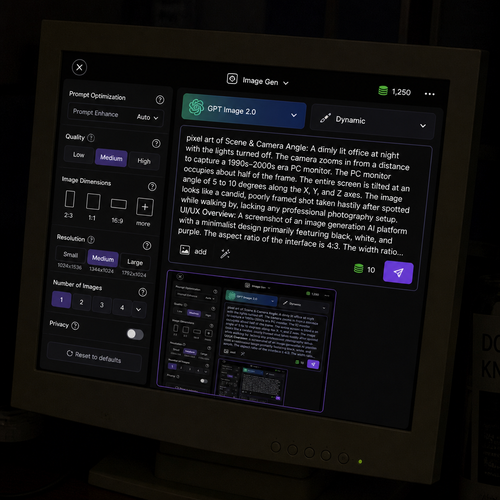
Scene & Camera Angle: A dimly lit office at night with the lights turned off. The camera zooms in from a distance to capture a 1990s–2000s era PC monitor. The PC monitor occupies about half of the frame. The entire screen is tilted at an angle of 5 to 10 degrees along the X, Y, and Z axes. The image looks like a candid, poorly framed shot taken hastily after spotted while walking by, lacking any professional photography setup. The screen displays the following content: UI/UX Overview: A screenshot of an image generation AI platform with a minimalist design primarily featuring black, white, and purple. The aspect ratio of the interface is 4:3. The width ratio between the settings panel (sidebar) and the image generation library (main content area) is 1:5. Top Navigation Bar: Top-Left: A close button represented by an "X" inside a circle, used to return home. Top-Center: A simple, square icon representing image generation, with the text "Image Gen ∨" next to it. Top-Right: An icon resembling stacked coins drawn in green, with the current credit balance displayed next to it. To the right of the credits, there is a white horizontal ellipsis (three dots). The background color of these top navigation icons is black. Left Panel (Settings - 25% Width): This section controls the detailed settings for image generation. Each setting group (Quality, Dimensions, etc.) is arranged horizontally, and each element enclosed in quotation marks represents a button, visually separated inside a dark gray rounded rectangle. A help icon (a question mark inside a circle) is placed to the right of each section heading. Prompt Optimization: At the top, there is a setting indicating whether to auto-convert the prompt. A small gray text reading "Prompt Enhance" is located at the top-right of the icon, with white text reading "Auto" at the bottom-right, followed to the right by a "∨" dropdown arrow on the far right. Quality: A section heading in small white text. Below it are three quality options arranged horizontally from left to right: "Low", "Medium", and "High". Image Dimensions: A section heading in small white text for aspect ratio settings. Below it, four text labels are listed horizontally from left to right: "2:3", "1:1", "16:9", and "more". Above each label, a white rectangular frame visually represents the corresponding aspect ratio. The visual representation for "more" (other ratios) features a square smaller than the 1:1 ratio, with a small "+" mark overlapping its bottom-right corner. Resolution: Below the aspect ratios, there are resolution settings with white text labels: "Small", "Medium", and "Large". Below each label, the detailed pixel dimensions (width and height) are written in small gray text. Number of Images: A heading in white text indicating the output count. Below it, there are tabs to select the number of images: "1", "2", "3", "4", followed to the white "∨" dropdown arrow to select higher numbers. Privacy: A privacy setting heading in white text. To its right sits a toggle switch with a light gray background and a white slider thumb. Reset Button: At the bottom, a "⟲ Reset to defaults" button in white text spans about half the width of the settings panel. Right Panel (Prompt & Library - 75% Width): This section consists of the prompt input field and the generated image library. Top Configuration Tabs (Left): A tab for the AI model selection shows "GPT Image 2.0". The background of this entire tab features a light blue gradient with a large, translucent graphic that looks like it is made of light-green glass, mimicking the GPT logo. Top Configuration Tabs (Right): A tab for the image theme selection features a thick brush icon on the far left, followed to the right by the text "Dynamic". Both tabs feature a "∨" dropdown arrow on their right edge. Prompt Input Field: Located below the tabs. The latter half of the prompt text overflows the text area and is truncated with an ellipsis ("..."). Bottom-Left of the field: An "add image" tab featuring an image icon next to the word "add", immediately followed to the right by a prompt refinement/polishing icon. Right edge of the field: The required credit cost for generation is displayed as a simple number next to a stacked-coin icon. Next to it is the send/generate icon, which features a white paper airplane on a purple background. Input Text: The text currently entered into this prompt field is exactly identical to this entire descriptive prompt text itself. Image Library: Below the input field. In the top-left corner of the library, a single generated image is displayed. This generated image is a recursive screenshot that is identical to the entire image generation interface itself.

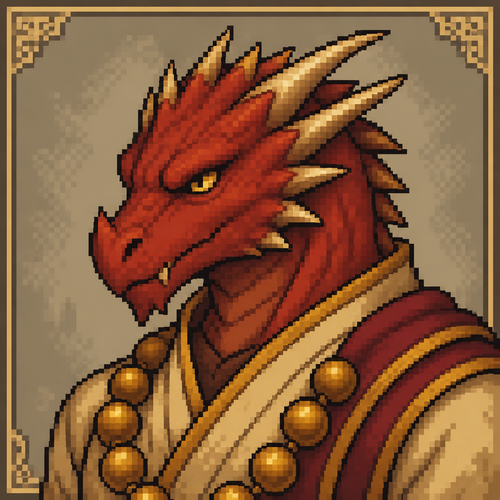
fire emblem style red dragonborn monk portrait for dnd without text and slightly mean looking
fire emblem style red dragonborn monk portrait for dnd without text and slightly mean looking

A huge titan holds a stone slab with houses, on the neck of the titan is a sign with the inscription proof of play

A huge titan holds a stone slab with houses, on the neck of the titan is a sign with the inscription proof of play

Create the logo of a game name gladius inferno with a gladiator pale skin, gold armer with red Crete on hemlet, holding a trident all in pixel art

Create the logo of a game name gladius inferno with a gladiator pale skin, gold armer with red Crete on hemlet, holding a trident all in pixel art

"Minimalist logo featuring a spectral arctic fox made of ice shards standing on a frozen trading card, with diamond suit patterns in background. Text 'ARCTIC GHOST TCG' below in frost-covered modern font. Color scheme: icy blue, ghostly white, and electric cyan glow. Clean lines, transparent background, vector art style."

"Minimalist logo featuring a spectral arctic fox made of ice shards standing on a frozen trading card, with diamond suit patterns in background. Text 'ARCTIC GHOST TCG' below in frost-covered modern font. Color scheme: icy blue, ghostly white, and electric cyan glow. Clean lines, transparent background, vector art style."

retro pixel art style, dusty rose and slate palette only (2-3 tones maximum), a stepped stone
pyramid on a high arid plateau, distant mountain ridgeline, lush plant life earth in the
foreground, empty of people and animals, wide open sky for overlay, no text

retro pixel art style, dusty rose and slate palette only (2-3 tones maximum), a stepped stone pyramid on a high arid plateau, distant mountain ridgeline, lush plant life earth in the foreground, empty of people and animals, wide open sky for overlay, no text

retro pixel art style, dusty rose and slate palette only (2-3 tones maximum), a stepped stone
pyramid on a high arid plateau, distant mountain ridgeline, dry terraced earth in the
foreground, no water, empty of people and animals, wide open sky for overlay, no text

retro pixel art style, dusty rose and slate palette only (2-3 tones maximum), a stepped stone pyramid on a high arid plateau, distant mountain ridgeline, dry terraced earth in the foreground, no water, empty of people and animals, wide open sky for overlay, no text

flat matte illustration, midday heat haze over a Mesoamerican step-pyramid in a dry scrubland
valley, strictly limited color palette (2-3 tones maximum): mustard and espresso brown only,
no other hues, cracked earth foreground, no water, empty of people and animals, large open
sky, no text

flat matte illustration, midday heat haze over a Mesoamerican step-pyramid in a dry scrubland valley, strictly limited color palette (2-3 tones maximum): mustard and espresso brown only, no other hues, cracked earth foreground, no water, empty of people and animals, large open sky, no text

"Minimalist logo featuring a spectral arctic fox made of ice shards standing on a frozen trading card, with diamond suit patterns in background. Text 'ARCTIC GHOST TCG' below in frost-covered modern font. Color scheme: icy blue, ghostly white, and electric cyan glow. Clean lines, transparent background, vector art style."

"Minimalist logo featuring a spectral arctic fox made of ice shards standing on a frozen trading card, with diamond suit patterns in background. Text 'ARCTIC GHOST TCG' below in frost-covered modern font. Color scheme: icy blue, ghostly white, and electric cyan glow. Clean lines, transparent background, vector art style."


retro pixel art style, night over a quiet lagoon fringed with palms, pyramid silhouettes
reflected in the water, strictly limited color palette (2-3 tones maximum): steel blue and
bronze only, no other hues, gentle ripples catching moonlight, empty of people and animals,
wide open space for overlay, no text

retro pixel art style, night over a quiet lagoon fringed with palms, pyramid silhouettes reflected in the water, strictly limited color palette (2-3 tones maximum): steel blue and bronze only, no other hues, gentle ripples catching moonlight, empty of people and animals, wide open space for overlay, no text

soft painterly gouache illustration, golden hour over a dense palm oasis with pyramids
rising beyond the tree line, strictly limited color palette (2-3 tones maximum): teal and
gold only, no other hues, a still reflecting pool surrounded by lush reeds, empty of people
and animals, open sky for overlay, no text

soft painterly gouache illustration, golden hour over a dense palm oasis with pyramids rising beyond the tree line, strictly limited color palette (2-3 tones maximum): teal and gold only, no other hues, a still reflecting pool surrounded by lush reeds, empty of people and animals, open sky for overlay, no text