Base model of a male merman character with no hair. Pixel art sprite, 64×96 pixels. Transparent background. Neutral standing pose.

Base model of a male merman character with no hair. Pixel art sprite, 64×96 pixels. Transparent background. Neutral standing pose.

More from the community

Base model of a female merman character with no hair. Pixel art sprite, 64×96 pixels. Transparent background. Neutral standing pose.

Base model of a female merman character with no hair. Pixel art sprite, 64×96 pixels. Transparent background. Neutral standing pose.

Base model of a male merman character with no hair. Pixel art sprite, 64×96 pixels. Transparent background. Neutral standing pose.

Base model of a male merman character with no hair. Pixel art sprite, 64×96 pixels. Transparent background. Neutral standing pose.

Make a 48x48 all white black outline naked woman. No face or hair. All white so I can use as a base model.
Make a 48x48 all white black outline naked woman. No face or hair. All white so I can use as a base model.

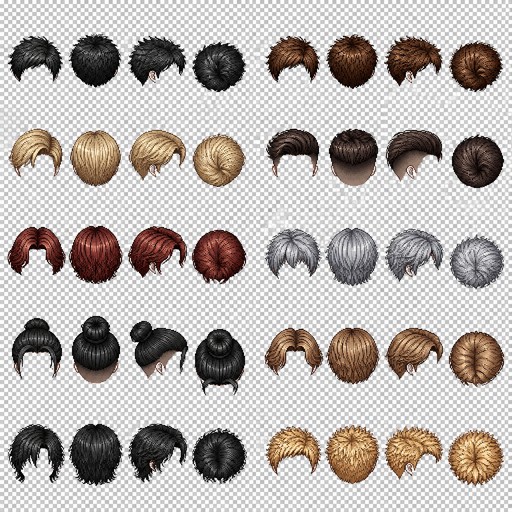
Create a pixel art hairstyle reference sprite sheet for a male 2D game character. Ten different realistic male hairstyles, each shown in four views: front view, back view, side view, and top-down view. Total: 16 hairstyle images arranged on one sheet.

Style: clean detailed pixel art for a character customization system. Transparent background. Hair only — no face, no head, no body, no neck. Designed as hairstyle overlays for a bald male base character sprite.

For each hairstyle create four matching views:

1. Front view.
2. Back view.
3. Side view.
4. Top-down view (bird’s-eye view for a top-down RPG character sprite).

Keep the exact same hairstyle design, length, color, and proportions across all 10 views. Maintain consistent alignment for use as interchangeable character customization assets.

Arrange all sprites in a clean grid layout. Pixel-perfect alignment. Transparent background. No text. No labels. No extra objects.

Game asset sprite sheet. Each image: 64×64 pixels. Designed to fit a 64×96 pixel male character base model.
Create a pixel art hairstyle reference sprite sheet for a male 2D game character. Ten different realistic male hairstyles, each shown in four views: front view, back view, side view, and top-down view. Total: 16 hairstyle images arranged on one sheet. Style: clean detailed pixel art for a character customization system. Transparent background. Hair only — no face, no head, no body, no neck. Designed as hairstyle overlays for a bald male base character sprite. For each hairstyle create four matching views: 1. Front view. 2. Back view. 3. Side view. 4. Top-down view (bird’s-eye view for a top-down RPG character sprite). Keep the exact same hairstyle design, length, color, and proportions across all 10 views. Maintain consistent alignment for use as interchangeable character customization assets. Arrange all sprites in a clean grid layout. Pixel-perfect alignment. Transparent background. No text. No labels. No extra objects. Game asset sprite sheet. Each image: 64×64 pixels. Designed to fit a 64×96 pixel male character base model.
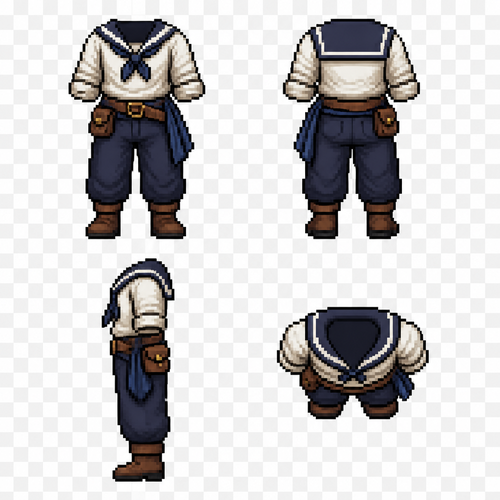
Create a pixel art clothing reference sprite sheet for a male 2D game character. A sailor outfit set shown in four views: front view, back view, side view, and top-down view. Total: 4 clothing images arranged on one sheet.

Style: clean detailed pixel art for a character customization system. Transparent background. Clothing only — no head, no hair, no body, no face. Designed as a clothing overlay for a male character sprite.

Sailor outfit design:

* Simple sailor shirt with rolled sleeves.
* Loose practical trousers suitable for sailing.
* Leather belt with small pouch.
* Simple sailor boots.
* Optional cloth sash or scarf detail.
* Practical everyday sailor clothing, not military, not fantasy armor.

Create four matching views:

1. Front view — complete outfit visible.
2. Back view — show back details and clothing shape.
3. Side view — accurate silhouette.
4. Top-down view (bird’s-eye view for a top-down RPG character sprite).

Keep the exact same outfit design, colors, proportions, and details across all four views. The clothing must align perfectly with the same male base character model.

Arrange the 4 sprites in a clean grid layout. Pixel-perfect alignment. Transparent background. No text. No labels. No extra objects.

Game asset sprite sheet. Each image: 64×64 pixels. Designed to fit a 64×96 pixel male character base model.

Create a pixel art clothing reference sprite sheet for a male 2D game character. A sailor outfit set shown in four views: front view, back view, side view, and top-down view. Total: 4 clothing images arranged on one sheet. Style: clean detailed pixel art for a character customization system. Transparent background. Clothing only — no head, no hair, no body, no face. Designed as a clothing overlay for a male character sprite. Sailor outfit design: * Simple sailor shirt with rolled sleeves. * Loose practical trousers suitable for sailing. * Leather belt with small pouch. * Simple sailor boots. * Optional cloth sash or scarf detail. * Practical everyday sailor clothing, not military, not fantasy armor. Create four matching views: 1. Front view — complete outfit visible. 2. Back view — show back details and clothing shape. 3. Side view — accurate silhouette. 4. Top-down view (bird’s-eye view for a top-down RPG character sprite). Keep the exact same outfit design, colors, proportions, and details across all four views. The clothing must align perfectly with the same male base character model. Arrange the 4 sprites in a clean grid layout. Pixel-perfect alignment. Transparent background. No text. No labels. No extra objects. Game asset sprite sheet. Each image: 64×64 pixels. Designed to fit a 64×96 pixel male character base model.

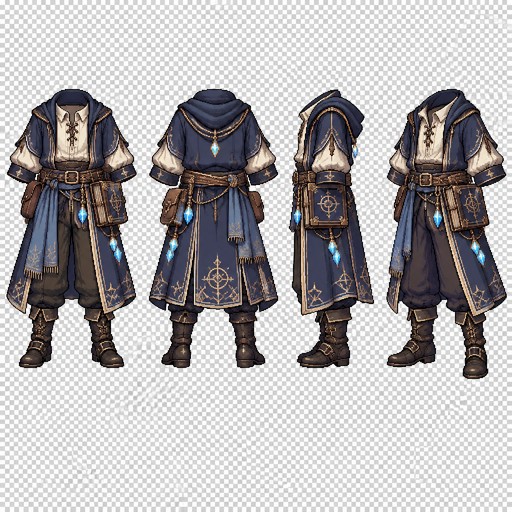
Create a pixel art clothing reference sprite sheet for an 8-directional walking animation for a male 2D game character. A medieval arcane scholar outfit, including a robe with a hood pulled down, golden chains with bluish glowing crystals dragging from a rope on his belt. He must have a satchel attached to his belt, and a spellbook as well.

Style: clean detailed pixel art for a character customization system. Transparent background. Clothing only — no head, no hair, no body, no face. Designed as a clothing overlay for a male character sprite.

Arcane Scholar clothing design:

* Tie-up long sleeve shirt
* Loose practical trousers suitable for movement.
* Leather belt with ropes, chained crystals, a spellbook and arcane trinks, as well as small pouch.
* Ornate leather boots.
* Optional cloth sash or scarf detail.
* Practical arcane robe, not military, not armor.

Create matching views:

1. Front view — complete outfit visible.
2. Back view — show back details and clothing shape.
3. Side view — accurate silhouette.
4. Diagonal View
Keep the exact same outfit design, colors, proportions, and details across all four views. The clothing must align perfectly with the same male base character model.

Arrange the 4 sprites in a clean grid layout. Pixel-perfect alignment. Transparent background. No text. No labels. No extra objects.

Game asset sprite sheet. Each image: 64×64 pixels. Designed to fit a 64×96 pixel male character base model.

Create a pixel art clothing reference sprite sheet for an 8-directional walking animation for a male 2D game character. A medieval arcane scholar outfit, including a robe with a hood pulled down, golden chains with bluish glowing crystals dragging from a rope on his belt. He must have a satchel attached to his belt, and a spellbook as well. Style: clean detailed pixel art for a character customization system. Transparent background. Clothing only — no head, no hair, no body, no face. Designed as a clothing overlay for a male character sprite. Arcane Scholar clothing design: * Tie-up long sleeve shirt * Loose practical trousers suitable for movement. * Leather belt with ropes, chained crystals, a spellbook and arcane trinks, as well as small pouch. * Ornate leather boots. * Optional cloth sash or scarf detail. * Practical arcane robe, not military, not armor. Create matching views: 1. Front view — complete outfit visible. 2. Back view — show back details and clothing shape. 3. Side view — accurate silhouette. 4. Diagonal View Keep the exact same outfit design, colors, proportions, and details across all four views. The clothing must align perfectly with the same male base character model. Arrange the 4 sprites in a clean grid layout. Pixel-perfect alignment. Transparent background. No text. No labels. No extra objects. Game asset sprite sheet. Each image: 64×64 pixels. Designed to fit a 64×96 pixel male character base model.

Create a pixel art clothing reference sprite sheet for a male pirate character in a 2D game. One complete pirate outfit set shown in four views: front view, back view, side view, and top-down view. Total: 4 clothing images arranged on one sheet.

Style: clean detailed pixel art for a character customization system. Transparent background. Clothing only — no head, no hair, no face, no body. Designed as a clothing overlay for a 64×96 pixel male character base model.

Pirate outfit design:

* Loose white pirate shirt with wide sleeves.
* Dark leather vest or open pirate coat.
* Pirate belt with small pouches.
* Loose dark trousers.
* Pirate boots.
* Optional simple shoulder sash or scarf.
* Practical fantasy pirate style, suitable for an adventure character.

Create four matching views:

1. Front view — full outfit visible.
2. Back view — show the back of the coat, vest, and belt details.
3. Side view — accurate silhouette and clothing layers.
4. Top-down view (bird’s-eye view for a top-down RPG character sprite).

Keep the exact same outfit design, colors, proportions, and details across all four views. Make the clothing fit the same character model.

Arrange all 4 sprites in a clean grid layout. Pixel-perfect alignment. Transparent background. No text. No labels. No character body. No extra objects.

Game asset sprite sheet. Each image: 64×96 pixels. Character customization clothing overlay.

Create a pixel art clothing reference sprite sheet for a male pirate character in a 2D game. One complete pirate outfit set shown in four views: front view, back view, side view, and top-down view. Total: 4 clothing images arranged on one sheet. Style: clean detailed pixel art for a character customization system. Transparent background. Clothing only — no head, no hair, no face, no body. Designed as a clothing overlay for a 64×96 pixel male character base model. Pirate outfit design: * Loose white pirate shirt with wide sleeves. * Dark leather vest or open pirate coat. * Pirate belt with small pouches. * Loose dark trousers. * Pirate boots. * Optional simple shoulder sash or scarf. * Practical fantasy pirate style, suitable for an adventure character. Create four matching views: 1. Front view — full outfit visible. 2. Back view — show the back of the coat, vest, and belt details. 3. Side view — accurate silhouette and clothing layers. 4. Top-down view (bird’s-eye view for a top-down RPG character sprite). Keep the exact same outfit design, colors, proportions, and details across all four views. Make the clothing fit the same character model. Arrange all 4 sprites in a clean grid layout. Pixel-perfect alignment. Transparent background. No text. No labels. No character body. No extra objects. Game asset sprite sheet. Each image: 64×96 pixels. Character customization clothing overlay.

Create a pixel art hairstyle reference sprite sheet for a male 2D game character. Four different realistic male hairstyles, each shown in four views: front view, back view, side view, and top-down view. Total: 16 hairstyle images arranged on one sheet.

Style: clean detailed pixel art for a character customization system. Transparent background. Hair only — no face, no head, no body, no neck. Designed as hairstyle overlays for a bald male base character sprite.

Hairstyle 1: Classic short haircut, neat sides and slightly longer hair on top.

Hairstyle 2: Medium-length messy hairstyle with natural loose strands and textured layers.

Hairstyle 3: Short modern hairstyle with swept-back hair and clean shape.

Hairstyle 4: Long casual male hairstyle reaching the shoulders, natural flowing strands.

For each hairstyle create four matching views:

1. Front view.
2. Back view.
3. Side view.
4. Top-down view (bird’s-eye view for a top-down RPG character sprite).

Keep the exact same hairstyle design, length, color, and proportions across all four views. Maintain consistent alignment for use as interchangeable character customization assets.

Arrange all 16 sprites in a clean grid layout. Pixel-perfect alignment. Transparent background. No text. No labels. No extra objects.

Game asset sprite sheet. Each image: 64×64 pixels. Designed to fit a 64×96 pixel male character base model.

Create a pixel art hairstyle reference sprite sheet for a male 2D game character. Four different realistic male hairstyles, each shown in four views: front view, back view, side view, and top-down view. Total: 16 hairstyle images arranged on one sheet. Style: clean detailed pixel art for a character customization system. Transparent background. Hair only — no face, no head, no body, no neck. Designed as hairstyle overlays for a bald male base character sprite. Hairstyle 1: Classic short haircut, neat sides and slightly longer hair on top. Hairstyle 2: Medium-length messy hairstyle with natural loose strands and textured layers. Hairstyle 3: Short modern hairstyle with swept-back hair and clean shape. Hairstyle 4: Long casual male hairstyle reaching the shoulders, natural flowing strands. For each hairstyle create four matching views: 1. Front view. 2. Back view. 3. Side view. 4. Top-down view (bird’s-eye view for a top-down RPG character sprite). Keep the exact same hairstyle design, length, color, and proportions across all four views. Maintain consistent alignment for use as interchangeable character customization assets. Arrange all 16 sprites in a clean grid layout. Pixel-perfect alignment. Transparent background. No text. No labels. No extra objects. Game asset sprite sheet. Each image: 64×64 pixels. Designed to fit a 64×96 pixel male character base model.

Create a pixel art armor and clothing reference sprite sheet for a male underwater fantasy RPG character. One complete fish scale armor set shown in four views: front view, back view, side view, and top-down view. Total: 4 armor sprites arranged on one sheet.

Style: detailed clean pixel art for a 2D game character customization system. Transparent background. Armor and clothing only — no head, no hair, no face, no body. Designed as an armor overlay for a 64×96 pixel male character base model.

Fish scale armor design:

* Lightweight armor made from overlapping fish scales covering the shoulders, chest, and arms.
* Layered scale patterns inspired by ocean creatures.
* Arm guards and shoulder pieces with curved shell-like shapes.
* Flexible waist armor made of scale plates.
* Dark aquatic fabric underneath the armor.
* Decorative ocean details: small shells, pearl elements, coral-like patterns.
* Elegant but practical design for an underwater warrior.
* No weapons, no helmet, no accessories.

Create four matching views:

1. Front view — show chest scales, shoulder armor, arm guards, and waist details.
2. Back view — show layered scales on the back and shoulder pieces.
3. Side view — show armor thickness and silhouette.
4. Top-down view (bird’s-eye view for a top-down RPG character sprite).

Keep the exact same armor design, scale pattern, colors, and proportions across all four views. The armor must align perfectly with the same male base character model.

Arrange all 4 sprites in a clean grid layout. Pixel-perfect alignment. Transparent background. No text. No labels. No character body. No extra objects.

Game asset sprite sheet. Each image: 64×96 pixels. Underwater fantasy armor overlay.

Create a pixel art armor and clothing reference sprite sheet for a male underwater fantasy RPG character. One complete fish scale armor set shown in four views: front view, back view, side view, and top-down view. Total: 4 armor sprites arranged on one sheet. Style: detailed clean pixel art for a 2D game character customization system. Transparent background. Armor and clothing only — no head, no hair, no face, no body. Designed as an armor overlay for a 64×96 pixel male character base model. Fish scale armor design: * Lightweight armor made from overlapping fish scales covering the shoulders, chest, and arms. * Layered scale patterns inspired by ocean creatures. * Arm guards and shoulder pieces with curved shell-like shapes. * Flexible waist armor made of scale plates. * Dark aquatic fabric underneath the armor. * Decorative ocean details: small shells, pearl elements, coral-like patterns. * Elegant but practical design for an underwater warrior. * No weapons, no helmet, no accessories. Create four matching views: 1. Front view — show chest scales, shoulder armor, arm guards, and waist details. 2. Back view — show layered scales on the back and shoulder pieces. 3. Side view — show armor thickness and silhouette. 4. Top-down view (bird’s-eye view for a top-down RPG character sprite). Keep the exact same armor design, scale pattern, colors, and proportions across all four views. The armor must align perfectly with the same male base character model. Arrange all 4 sprites in a clean grid layout. Pixel-perfect alignment. Transparent background. No text. No labels. No character body. No extra objects. Game asset sprite sheet. Each image: 64×96 pixels. Underwater fantasy armor overlay.

Create a pixel art clothing reference sprite sheet for a sunken pirate character in a 2D underwater fantasy game. One complete pirate outfit set shown in four views: front view, back view, side view, and top-down view. Total: 4 clothing sprites arranged on one sheet.

Style: detailed clean pixel art for a character customization system. Transparent background. Clothing only — no head, no hair, no face, no body. Designed as a clothing overlay for a 64×96 pixel male character base model.

Sunken pirate outfit design:

* Old torn pirate coat with damaged edges, partially covered with seaweed.
* Weathered open vest with worn fabric texture.
* Ragged pirate shirt with loose sleeves.
* Old leather belt with rusty buckle and small pouches.
* Torn dark trousers.
* Damaged pirate boots covered with barnacles and ocean wear.
* Small underwater details: shells, algae, faded fabric, signs of being lost at sea.
* Dark aged colors, realistic worn pirate style, suitable for an underwater civilization setting.

Create four matching views:

1. Front view — full outfit visible, damaged coat and belt details.
2. Back view — show torn coat, seaweed, and worn fabric details.
3. Side view — accurate clothing layers and silhouette.
4. Top-down view (bird’s-eye view for a top-down RPG character sprite).

Keep the exact same outfit design, colors, proportions, and details across all four views. The clothing must align perfectly with the same male base character model.

Arrange all 4 sprites in a clean grid layout. Pixel-perfect alignment. Transparent background. No text. No labels. No character body. No extra objects.

Game asset sprite sheet. Each image: 64×96 pixels. Underwater fantasy RPG clothing overlay.

Create a pixel art clothing reference sprite sheet for a sunken pirate character in a 2D underwater fantasy game. One complete pirate outfit set shown in four views: front view, back view, side view, and top-down view. Total: 4 clothing sprites arranged on one sheet. Style: detailed clean pixel art for a character customization system. Transparent background. Clothing only — no head, no hair, no face, no body. Designed as a clothing overlay for a 64×96 pixel male character base model. Sunken pirate outfit design: * Old torn pirate coat with damaged edges, partially covered with seaweed. * Weathered open vest with worn fabric texture. * Ragged pirate shirt with loose sleeves. * Old leather belt with rusty buckle and small pouches. * Torn dark trousers. * Damaged pirate boots covered with barnacles and ocean wear. * Small underwater details: shells, algae, faded fabric, signs of being lost at sea. * Dark aged colors, realistic worn pirate style, suitable for an underwater civilization setting. Create four matching views: 1. Front view — full outfit visible, damaged coat and belt details. 2. Back view — show torn coat, seaweed, and worn fabric details. 3. Side view — accurate clothing layers and silhouette. 4. Top-down view (bird’s-eye view for a top-down RPG character sprite). Keep the exact same outfit design, colors, proportions, and details across all four views. The clothing must align perfectly with the same male base character model. Arrange all 4 sprites in a clean grid layout. Pixel-perfect alignment. Transparent background. No text. No labels. No character body. No extra objects. Game asset sprite sheet. Each image: 64×96 pixels. Underwater fantasy RPG clothing overlay.

Create a pixel art clothing reference sprite sheet for a ghost pirate character in a 2D underwater fantasy RPG game. One complete ghost pirate outfit set shown in four views: front view, back view, side view, and top-down view. Total: 4 clothing sprites arranged on one sheet.

Style: detailed clean pixel art for a character customization system. Transparent background. Clothing only — no head, no hair, no face, no body. Designed as a clothing overlay for a 64×96 pixel male character base model.

Ghost pirate outfit design:

* Tattered old pirate coat with torn floating edges.
* Faded ghostly pirate shirt with worn fabric.
* Old open vest with damaged seams.
* Ancient pirate belt with a rusty buckle and small pouches.
* Torn pirate trousers with ragged ends.
* Old worn boots with a supernatural appearance.
* Flowing translucent fabric elements that look like a ghostly underwater spirit.
* Subtle ghost details: faint mist-like cloth edges, spectral fabric, ancient cursed pirate style.
* No weapons, no accessories, no character body.

Create four matching views:

1. Front view — show the torn coat, vest, and belt details.
2. Back view — show the floating coat tails and damaged fabric.
3. Side view — show the layered clothing silhouette.
4. Top-down view (bird’s-eye view for a top-down RPG character sprite).

Keep the exact same outfit design, proportions, colors, and ghostly details across all four views. The clothing must align perfectly with the same male base character model.

Arrange all 4 sprites in a clean grid layout. Pixel-perfect alignment. Transparent background. No text. No labels. No character body. No extra objects.

Game asset sprite sheet. Each image: 64×96 pixels. Underwater ghost pirate clothing overlay.

Create a pixel art clothing reference sprite sheet for a ghost pirate character in a 2D underwater fantasy RPG game. One complete ghost pirate outfit set shown in four views: front view, back view, side view, and top-down view. Total: 4 clothing sprites arranged on one sheet. Style: detailed clean pixel art for a character customization system. Transparent background. Clothing only — no head, no hair, no face, no body. Designed as a clothing overlay for a 64×96 pixel male character base model. Ghost pirate outfit design: * Tattered old pirate coat with torn floating edges. * Faded ghostly pirate shirt with worn fabric. * Old open vest with damaged seams. * Ancient pirate belt with a rusty buckle and small pouches. * Torn pirate trousers with ragged ends. * Old worn boots with a supernatural appearance. * Flowing translucent fabric elements that look like a ghostly underwater spirit. * Subtle ghost details: faint mist-like cloth edges, spectral fabric, ancient cursed pirate style. * No weapons, no accessories, no character body. Create four matching views: 1. Front view — show the torn coat, vest, and belt details. 2. Back view — show the floating coat tails and damaged fabric. 3. Side view — show the layered clothing silhouette. 4. Top-down view (bird’s-eye view for a top-down RPG character sprite). Keep the exact same outfit design, proportions, colors, and ghostly details across all four views. The clothing must align perfectly with the same male base character model. Arrange all 4 sprites in a clean grid layout. Pixel-perfect alignment. Transparent background. No text. No labels. No character body. No extra objects. Game asset sprite sheet. Each image: 64×96 pixels. Underwater ghost pirate clothing overlay.

Create a pixel art armor and clothing reference sprite sheet for a male underwater fantasy RPG character. One complete fish scale armor set shown in four views: front view, back view, side view, and top-down view. Total: 4 armor sprites arranged on one sheet.

Style: detailed clean pixel art for a 2D game character customization system. Transparent background. Armor and clothing only — no head, no hair, no face, no body. Designed as an armor overlay for a 64×96 pixel male character base model.

Fish scale armor design:

* Lightweight armor made from overlapping fish scales covering the shoulders, chest, and arms.
* Layered scale patterns inspired by ocean creatures.
* Arm guards and shoulder pieces with curved shell-like shapes.
* Flexible waist armor made of scale plates.
* Dark aquatic fabric underneath the armor.
* Decorative ocean details: small shells, pearl elements, coral-like patterns.
* Elegant but practical design for an underwater warrior.
* No weapons, no helmet, no accessories.

Create four matching views:

1. Front view — show chest scales, shoulder armor, arm guards, and waist details.
2. Back view — show layered scales on the back and shoulder pieces.
3. Side view — show armor thickness and silhouette.
4. Top-down view (bird’s-eye view for a top-down RPG character sprite).

Keep the exact same armor design, scale pattern, colors, and proportions across all four views. The armor must align perfectly with the same male base character model.

Arrange all 4 sprites in a clean grid layout. Pixel-perfect alignment. Transparent background. No text. No labels. No character body. No extra objects.

Game asset sprite sheet. Each image: 64×96 pixels. Underwater fantasy armor overlay.

Create a pixel art armor and clothing reference sprite sheet for a male underwater fantasy RPG character. One complete fish scale armor set shown in four views: front view, back view, side view, and top-down view. Total: 4 armor sprites arranged on one sheet. Style: detailed clean pixel art for a 2D game character customization system. Transparent background. Armor and clothing only — no head, no hair, no face, no body. Designed as an armor overlay for a 64×96 pixel male character base model. Fish scale armor design: * Lightweight armor made from overlapping fish scales covering the shoulders, chest, and arms. * Layered scale patterns inspired by ocean creatures. * Arm guards and shoulder pieces with curved shell-like shapes. * Flexible waist armor made of scale plates. * Dark aquatic fabric underneath the armor. * Decorative ocean details: small shells, pearl elements, coral-like patterns. * Elegant but practical design for an underwater warrior. * No weapons, no helmet, no accessories. Create four matching views: 1. Front view — show chest scales, shoulder armor, arm guards, and waist details. 2. Back view — show layered scales on the back and shoulder pieces. 3. Side view — show armor thickness and silhouette. 4. Top-down view (bird’s-eye view for a top-down RPG character sprite). Keep the exact same armor design, scale pattern, colors, and proportions across all four views. The armor must align perfectly with the same male base character model. Arrange all 4 sprites in a clean grid layout. Pixel-perfect alignment. Transparent background. No text. No labels. No character body. No extra objects. Game asset sprite sheet. Each image: 64×96 pixels. Underwater fantasy armor overlay.